We’re excited to launch one of the most requested features in NetTrack: Goals.
Goals bring intentional saving directly into your budgeting workflow, making it easier to plan for the future while keeping your finances organized in one place.
Whether you’re building an emergency fund, saving for a vacation, or working toward a house down payment, Goals helps you track progress automatically as your accounts grow.
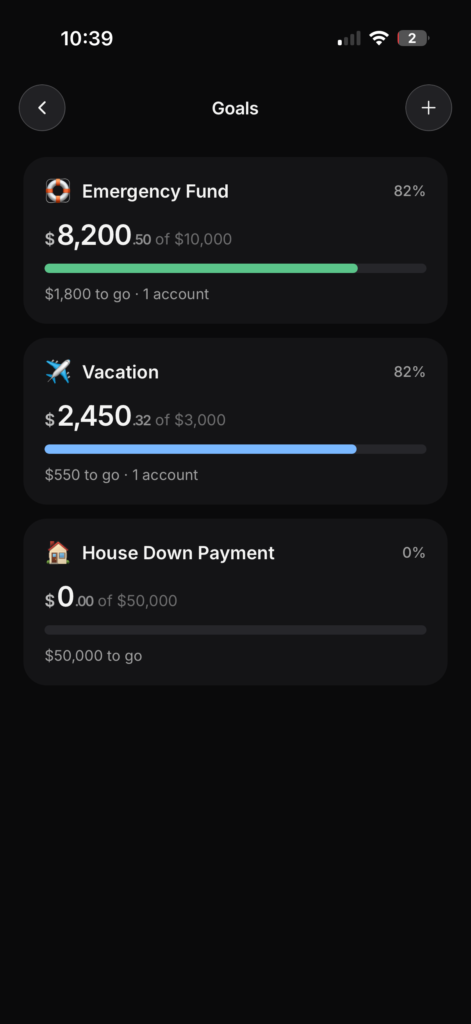
Savings Goals Built Into Your Budget
Goals are fully integrated into the Budget experience in NetTrack. Instead of managing savings separately in spreadsheets or disconnected apps, you can now create and track goals directly alongside your monthly budget.
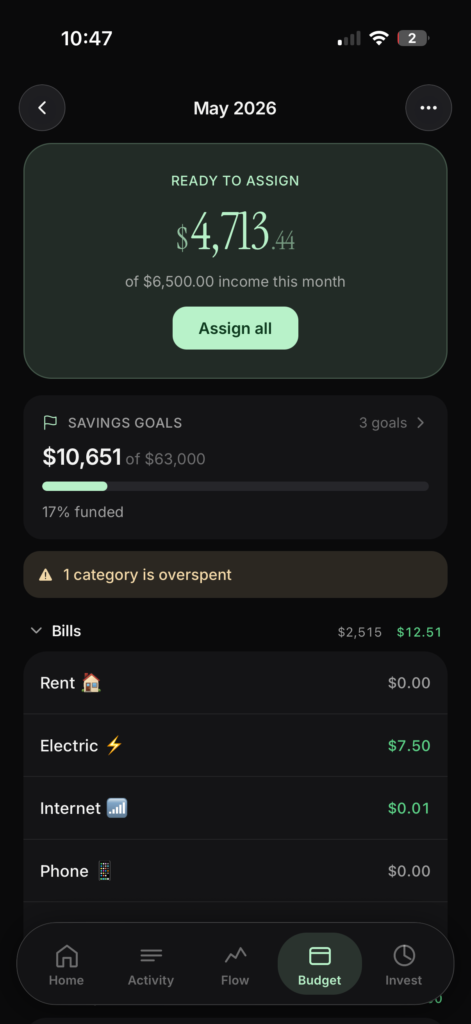
With Goals, you can:
- Create custom savings goals
- Set target amounts
- Assign one or more accounts to each goal
- Configure goal priority
- Track funding progress automatically
- View total progress across all goals
As your linked account balances change, your goals update automatically in real time — no manual tracking required.
Flexible Goal Tracking
Every goal can be customized to match how you actually save money.
Want to dedicate a high-yield savings account entirely to your emergency fund? You can assign that account directly to the goal.
Saving for multiple things from the same account? Goals can still track progress automatically while helping you prioritize what matters most.
You can create goals for things like:
- Emergency funds
- Vacations
- House down payments
- Weddings
- New cars
- Investment milestones
- Anything else you’re saving toward
Shared Household Goals
We’re also introducing Household Goals.
With the new Household settings, NetTrack now supports shared savings goals between household members. This makes it easier for couples and families to collaborate on larger financial milestones together.
Shared goals automatically reflect combined account progress, helping everyone stay aligned and motivated.
Perfect for:
- Saving for a home together
- Planning a shared vacation
- Building a joint emergency fund
- Wedding planning
- Shared long-term financial planning
Designed to Feel Automatic
One of the biggest goals with this release was reducing manual work.
Most budgeting apps require constant updates and maintenance. NetTrack Goals are designed to stay in sync automatically using your connected accounts and real balances.
That means less time managing spreadsheets — and more time actually making progress toward your financial goals.
Available Now
Goals are now available in the latest version of NetTrack.
To get started:
- Open the Budget tab
- Tap into Savings Goals
- Create your first goal
- Assign accounts and priorities
- Watch your progress update automatically
We’re excited to continue expanding budgeting and planning tools inside NetTrack, and this is just the beginning.
Leave a Reply