Category: Updates

  • Introducing NetTrack Investments — Your Entire Portfolio, Now in One Place

    Introducing NetTrack Investments — Your Entire Portfolio, Now in One Place

    Today marks a huge milestone for NetTrack. You asked for powerful investment tracking, deeper insights, and smarter AI support — and this release delivers all of that and more.

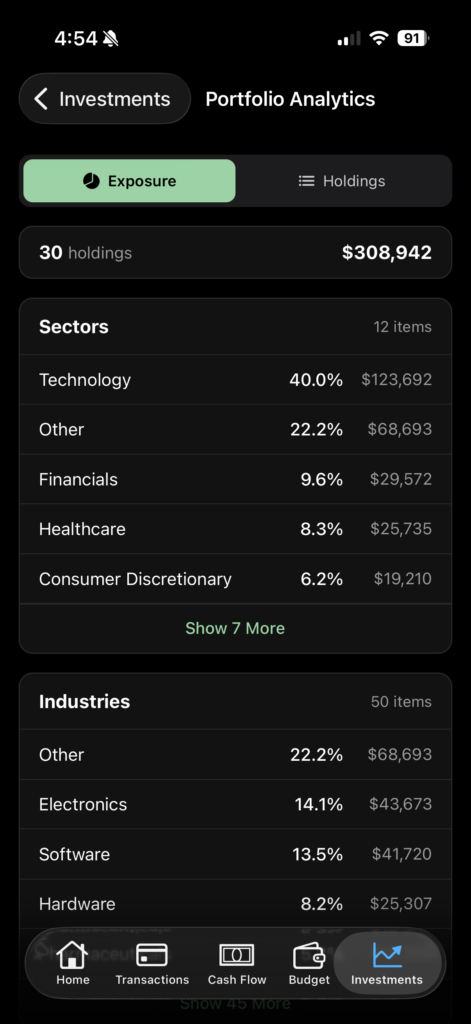
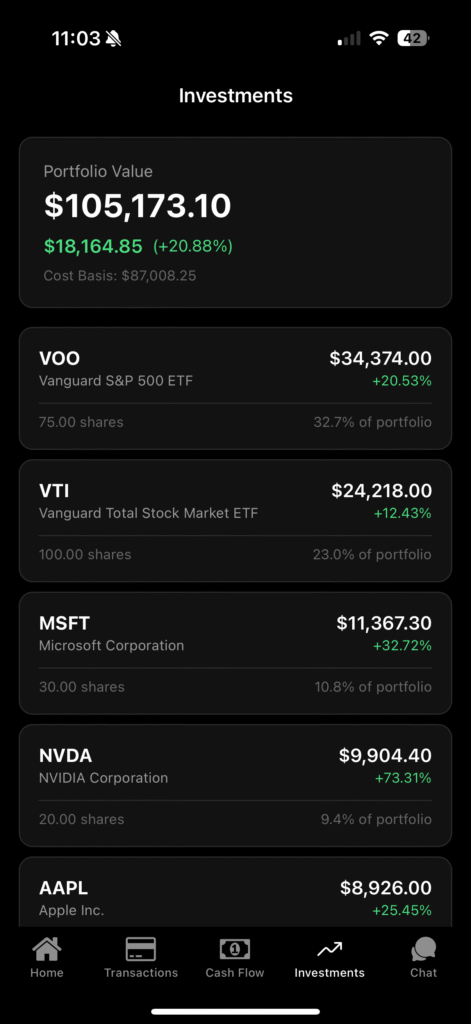
    Say hello to NetTrack Investments, your new home for viewing, understanding, and analyzing everything you own across all connected investment accounts.


    View All Your Investments in the New Investments Tab

    With this update, NetTrack now automatically pulls in your holdings from your linked investment accounts — stocks, ETFs, crypto, and more.

    You’ll see:

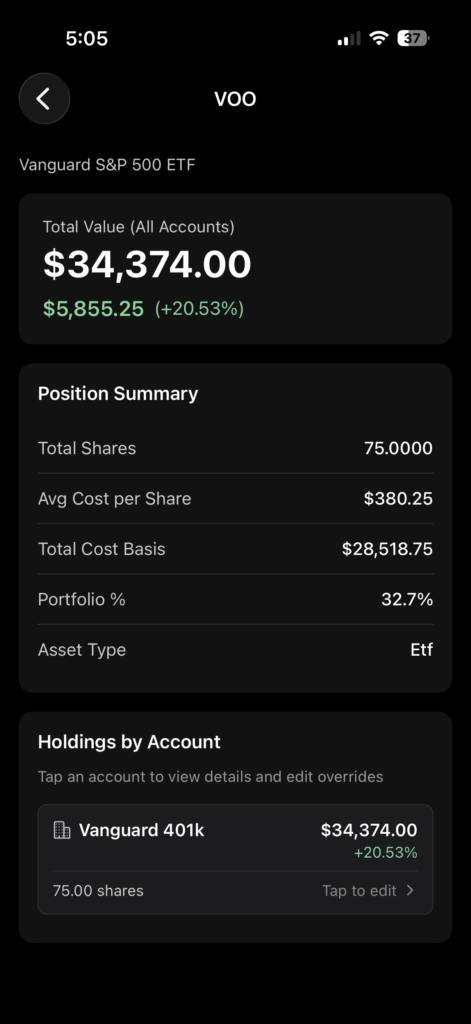
    • Total portfolio value
    • Holdings grouped by account
    • Per-symbol breakdowns
    • Gain/loss calculations
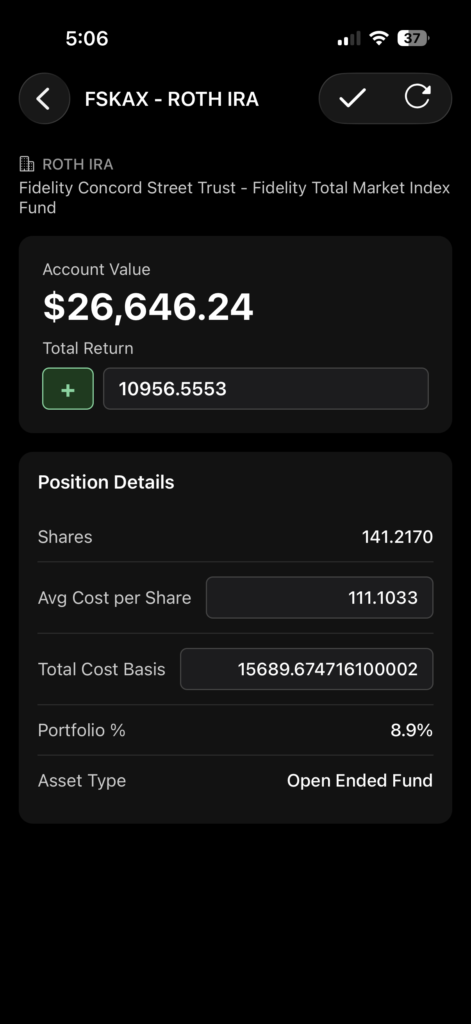
    • Allocation & cost basis
    • Clean, visual summaries built for clarity

    No more jumping between apps or spreadsheets. Everything is now centralized, beautifully organized, and refreshed automatically.


    Ask AI Chat About Your Investments

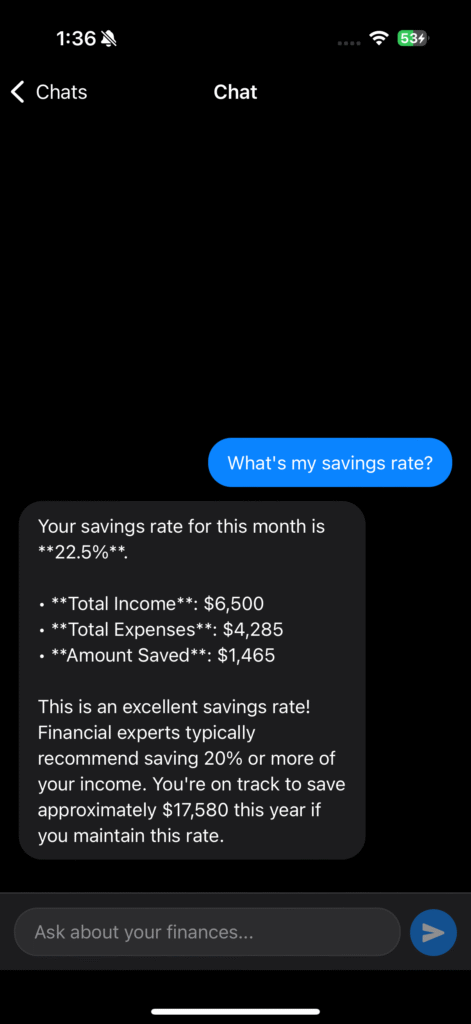
    NetTrack’s AI Chat just got way smarter.

    You can now ask questions like:

    • “How is my portfolio doing this month?”
    • “Which of my investments grew the most?”
    • “What’s my allocation by asset class?”
    • “How much has my Tesla position gained overall?”

    Your AI assistant now understands your holdings data and can break down performance instantly — giving you real insight without the math.


    New: Search Inside AI Chat

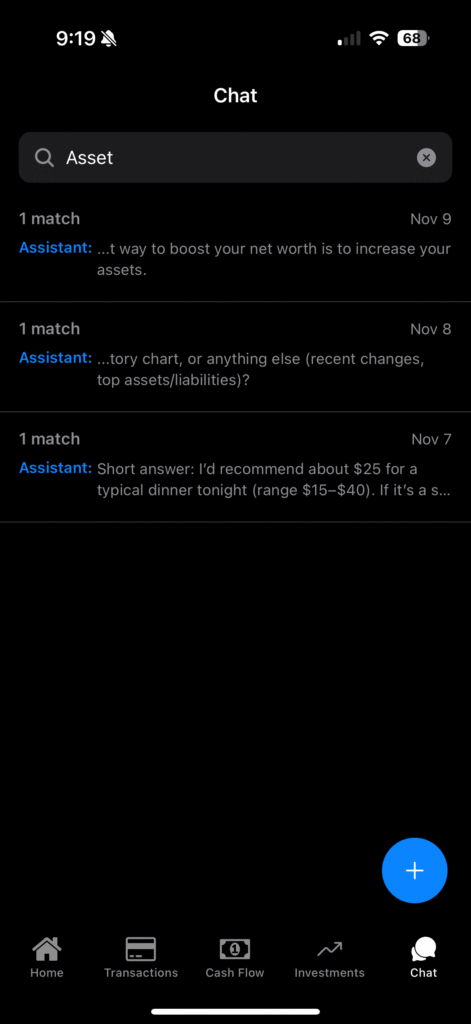
    Big improvement to the chat experience: You can now search inside AI Chat to quickly find past answers, insights, or financial breakdowns.

    Useful for:

    • Jumping back to an analysis you liked
    • Finding previous monthly summaries
    • Quickly referencing older conversations

    Your financial journey just became easier to navigate.


    More to Come

    NetTrack Investments is just the beginning. Soon, you’ll get:

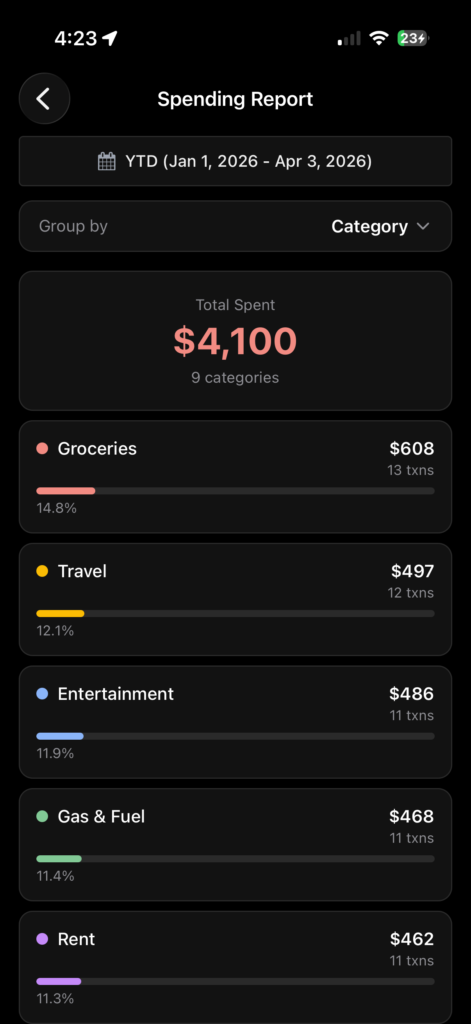
    • Asset-class charts
    • Country/industry allocation
    • Insights on diversification and risk
    • Portfolio trend charts

    Head to the App Store and update NetTrack to get these latest updates!

    As always, let us know what you think and what you want to see in the future. You can contact us from within the app, or respond directly to this email.

  • Introducing AI Chat in NetTrack: Talk to Your Money

    Introducing AI Chat in NetTrack: Talk to Your Money

    Managing your money just got a lot more personal.

    Now you can chat directly with your finances — right inside the NetTrack app.

    We’re excited to introduce AI Chat, your new personal finance assistant designed to help you understand your money faster and more naturally than ever before.


    What Is AI Chat?

    AI Chat lets you have real, conversational interactions with your finances.

    Instead of digging through charts or reports, just ask questions in plain English and get instant, personalized answers based on your real data.

    Try asking things like:

    • “What’s my net worth this month?”
    • “How much did I spend on restaurants last week?”
    • “What’s my savings rate over the last 3 months?”
    • “Am I trending up or down compared to last month?”

    Within seconds, you’ll get clear insights powered by your actual account data — no spreadsheets required.


    Get Started

    Update to the latest version of NetTrack next week to start chatting with your money.

    Just tap the new AI Chat icon in the app — and ask away.

    We’re already working on even smarter financial insights, daily summaries, and proactive suggestions to make managing your money even easier.

  • New in NetTrack: Highest Net Worth Tracking + Snapshot Management

    New in NetTrack: Highest Net Worth Tracking + Snapshot Management

    We’ve added two highly requested features that make tracking your financial journey even easier — and more motivating than ever.

    🏆 1. Highest Net Worth Tracking

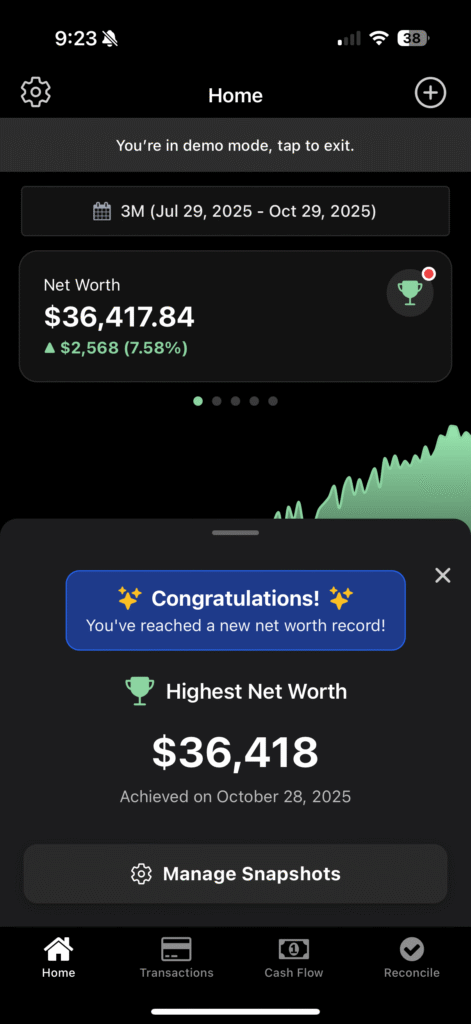
    NetTrack now keeps track of your highest net worth ever recorded — and celebrates each new milestone you achieve.
    Whenever your net worth hits a new all-time high, you’ll get a congratulatory notification letting you know you’ve set a new personal record.

    It’s a small moment of recognition that helps you see your progress over time and stay motivated to keep growing your wealth.

    💡 Tip: You can view your current and highest net worth anytime on the Home screen — complete with your growth percentage and time range.


    📅 2. Manage Snapshots

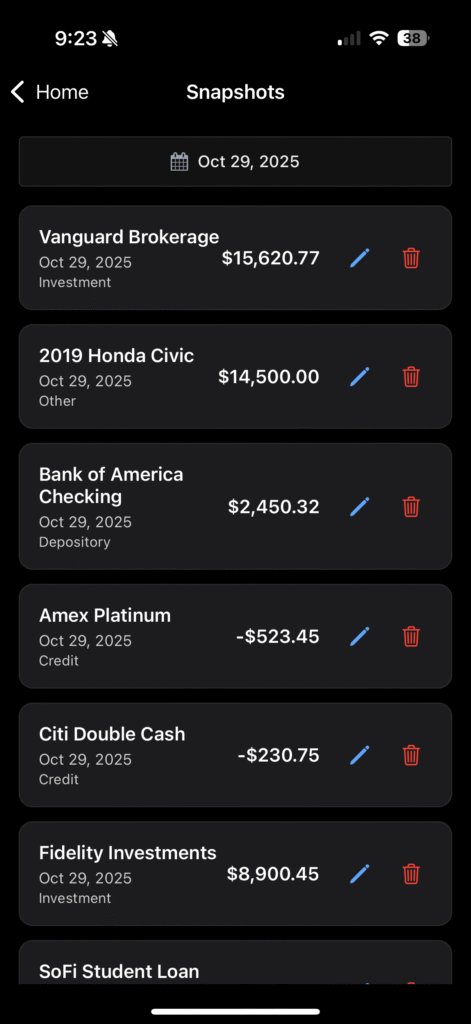
    You can now easily view, edit, or delete your account snapshots for any date — right from the new Manage Snapshots screen.

    This makes it simple to:

    • Review all your assets and debts for a specific day
    • Update balances or categories if something changes
    • Clean up old or demo data

    Whether you’re fine-tuning your historical records or keeping things tidy, snapshot management gives you full control over your financial history.


    🌟 Try It Out

    These updates are now live in the latest version of NetTrack. Update to the latest version, and head to your Home screen, view your latest snapshot, and see how close you are to hitting your next record high!

  • New in NetTrack: Net Worth Groups

    New in NetTrack: Net Worth Groups

    We just released a brand new update to NetTrack with some exciting new features.

    📊 Swipeable Net Worth Card
    Your total net worth just got more insightful. Now you can swipe through a redesigned card that breaks down all your assets into Cash, Credit, Investments, and Other categories.

    Each section comes with its own snapshot chart, so you can quickly see trends and spot changes at a glance.

    Quick Add Transactions
    Keeping your accounts up to date is faster than ever. We’ve added a new floating action button (FAB) that lets you add manual transactions on the spot. Whether it’s logging a quick expense or tracking income, you can update your finances in seconds.

    🚀 Try It Out Today
    These updates are live now on iOS, Android. Update your app to explore the new Net Worth view and enjoy a smoother transaction experience.

    As always, we’d love your feedback. Reply to this email and let us know what you think — your input helps shape the future of NetTrack.

  • New in NetTrack: Streamlined Reconciliation

    New in NetTrack: Streamlined Reconciliation

    At NetTrack, we’re always looking for ways to make managing your money simpler and more intuitive. That’s why we’re excited to announce a major update to the Reconciliation experience — designed to help you stay on top of your finances with less effort.


    ✅ Track Your Progress at a Glance

    Reconciling your transactions is now easier than ever. At the top of the screen, you’ll see a progress indicator showing how many transactions remain. This gives you a clear sense of how close you are to completing your review — and adds a little motivation to get to zero.


    📋 Clean List View of All Transactions

    We’ve redesigned reconciliation into a scrollable list view, so you can see all pending transactions in one place. No more bouncing back and forth — now you have a full overview to spot patterns and quickly work through your updates.


    ⚡ Quick Categorization Buttons

    Time is money, so we’ve made it faster to categorize. Each transaction now comes with one-tap buttons for:

    • Income
    • Expense
    • Other

    You can also assign categories with a dropdown and even create rules for future transactions to auto-categorize them. The more you reconcile, the smarter NetTrack gets.


    🚀 Try It Out Today

    The updated Reconciliation screen is now live in the latest version of NetTrack on iOS, Android, and Web. Update your app and see how much smoother your financial reviews can be.

    Be sure to let us know what features or improvements you’d like to see next! We’re always listening – you can simply reply directly to this email.

  • New in NetTrack: Streaks + Financial Check-In Reminders

    New in NetTrack: Streaks + Financial Check-In Reminders

    We just dropped a brand new NetTrack update, and it’s all about helping you build better money habits over time. Here’s what’s new in this release:

    🔥 Weekly Streaks

    Every time you check in to NetTrack, we track your momentum. Now, you’ll see a Streak tracker right in your Settings screen that shows how many consecutive weeks you’ve reviewed your finances.

    Whether it’s a quick net worth glance or a deeper dive into your accounts, every check-in counts toward your streak. Miss a week? The streak resets — but don’t worry, it’s a fresh opportunity to build that consistency back up!

    🛎️ Financial Review Reminders

    Need a nudge to stay on top of your money? We’ve added a new notification setting to help you stay on track.

    Head to Settings → Notifications, and you’ll find a new option for Financial Review Reminders. You can set how often you’d like to be reminded — weekly, biweekly, or monthly — and we’ll send you a gentle push to check in and keep your streak going.

    Bonus: If you check in before your selected reminder interval, we won’t bug you. Reminders are smart — they’ll only show up if you haven’t checked in recently.


    This update is all about helping you stay engaged and proactive with your finances — even when life gets busy. We hope you love it.

    As always, we’re listening — so if you have feedback or ideas, drop us a message in the app or reply directly to this email!

    🔄 Update now to start tracking your streaks and set your reminders!

  • 🎉 New Feature: Refer Your Friends and Earn Free Months of NetTrack Pro!

    🎉 New Feature: Refer Your Friends and Earn Free Months of NetTrack Pro!

    We’re excited to announce one of our most requested features — Referrals are here!

    Starting today, you can invite friends to try NetTrack Pro and get rewarded when they join. It’s our way of saying thanks for helping more people take control of their finances.


    🤝 How It Works

    It’s simple:

    1. Open the Settings screen in the NetTrack app
    2. Tap on “Referrals”
    3. Copy your unique invite link
    4. Share it with friends, family, coworkers — anyone who needs to track their net worth

    When someone signs up for NetTrack Pro using your link, both of you get a free month of NetTrack Pro — no strings attached.

    And the best part?

    🆓 No referral limits — refer as many people as you want and stack up free months!


    📱 Here’s What It Looks Like

    You’ll find everything you need — your referral link, how many free months you’ve earned, and more — right inside the app.


    🎯 Why We Built It

    NetTrack is growing fast — and it’s because of users like you. Many of you have asked for a way to share the app with friends and be rewarded for it. Now you can.

    We believe that financial tools should be accessible, and referrals help more people discover NetTrack while rewarding our most passionate users.


    🚀 Ready to Share?

    Make sure you update NetTrack to the lates version in the App Store.

    Head to your Settings → Referrals, grab your unique link, and start sharing. You’ll help friends build wealth and earn free months of NetTrack Pro.

    Let’s grow together. 💙

    👉 Open NetTrack and get your referral link

  • Introducing Households: Track Your Net Worth Together

    Introducing Households: Track Your Net Worth Together

    We’re excited to announce a new feature our community has been asking for: Households. 🎉

    With Households, you and your partner (or family) can now view and manage your NetTrack accounts together, making it easier to track your collective net worth, align your financial goals, and build wealth as a team.

    Why Households?

    For many, finances aren’t managed in a vacuum. Couples and families often share expenses, savings goals, and investment plans. Yet, most net worth tracking tools are built for individuals only.

    NetTrack Households allows you to:
    ✅ Combine accounts with your partner or family
    ✅ Track your household’s net worth in one unified view
    ✅ Share account balances and snapshots easily
    ✅ Maintain individual logins for privacy and security

    How It Works

    1. Create or Join a Household: As a user, you can create a household from your settings and invite your partner or family members by email.
    2. View Personal or Household: Seamlessly toggle between your personal net worth and your household’s combined view.
    3. Privacy & Simplicity: Only account balances and snapshots are shared in your household, not transactions, ensuring you can track your collective finances while maintaining individual privacy.
    4. Total Control: Add or remove members at any time. Once you join a Houehold, you can leave at anytime and your data will no longer be shared.

    🚨 Currently in Beta: Households is available to all users while we gather feedback. Fine-grained access controls and shared transaction views are coming soon.

    Why We Built This

    At NetTrack, we believe that financial clarity should extend to the people who matter most to you. Whether you’re saving for a house, planning for a wedding, or building your investments together, having a clear view of your shared financial picture is a game-changer.

    Households is another step in our mission to provide simple, powerful, and privacy-first net worth tracking that actually sticks.

    Ready to Get Started?

    Update your app to the latest version and navigate to Settings → Household to start building your household today.

    If you have questions or feedback, we’d love to hear from you. Your insights help shape the future of NetTrack.


    Track your net worth together, and build your future—together.

    ✨ Try Households now and take control of your shared financial journey.

  • New in NetTrack

    New in NetTrack

    🚀 NetTrack Update: Smarter Reconciliation, Flexible Modes, and Faster Workflow

    We’ve rolled out powerful new features in NetTrack to make managing your transactions even easier:


    ✅ 1. Create Rules for Future Transactions While Reconciling

    When you reconcile a transaction, you can now create a rule for future transactions directly during reconciliation with a simple toggle.

    This means:

    • No need to repeat manual categorization.
    • Transactions with the same merchant or pattern will auto-categorize next time, saving you time.
    • Keeps your reconciliation queue clean and your net worth tracking accurate.

    ✅ 2. New Reconciliation Modes

    We now support three reconciliation modes:

    • Automatic (default): Uses our AI to automatically categorize transactions and only prompts you for transactions with low confidence.
    • Manual: Want complete control? Review and reconcile all transactions without a matching rule.
    • Disabled: Prefer not to reconcile? You can now turn reconciliation off entirely.

    This flexibility means you can tailor NetTrack to your workflow:

    • Let automation handle it for you.
    • Or take full control if you want to review every transaction.
    • Or disable if you prefer a fully automated net worth tracking experience.

    ✅ 3. Mark All as Reconciled

    Need to clear your reconciliation queue and start fresh?

    With a single tap, you can now mark all transactions as reconciled, allowing you to reset your workflow, switch reconciliation modes, or declutter your backlog.


    Why it matters:

    These updates empower you to:
    ✅ Automate your finances with precision.
    ✅ Maintain control when you want it.
    ✅ Save hours while keeping your net worth data clean.


    Coming Soon:

    We’re continuing to improve NetTrack every day based off of your feedback! Please keep sending us what you’d like to see in future updates (you can reply directly to this email!).


    Ready to try these new features?
    Make sure to get the latest version of NetTrack from the app store. Head to the Reconcile tab in your NetTrack app to experience a smoother, smarter way to manage your transactions.

  • New in NetTrack: Multi-Currency Support

    New in NetTrack: Multi-Currency Support

    We’re excited to roll out one of our most requested features in NetTrack — multi-currency support!

    💱 Set Your Preferred Currency

    You can now choose from dozens of global currencies in the new Currency Settings screen. Whether your finances span USD, EUR, GBP, JPY, or even the Eritrean Nakfa 🇪🇷, NetTrack has you covered.

    Once selected, NetTrack will convert all your financial data — including account balances, net worth snapshots, and transactions — to your preferred currency.

    📈 Historical Accuracy That Matters

    What sets NetTrack apart is our historical FX conversion engine. We don’t just convert using today’s rate — we use the exact historical exchange rate from the date of each transaction or snapshot, ensuring your charts and trends remain accurate over time.

    🔍 Consistent Experience Across the App

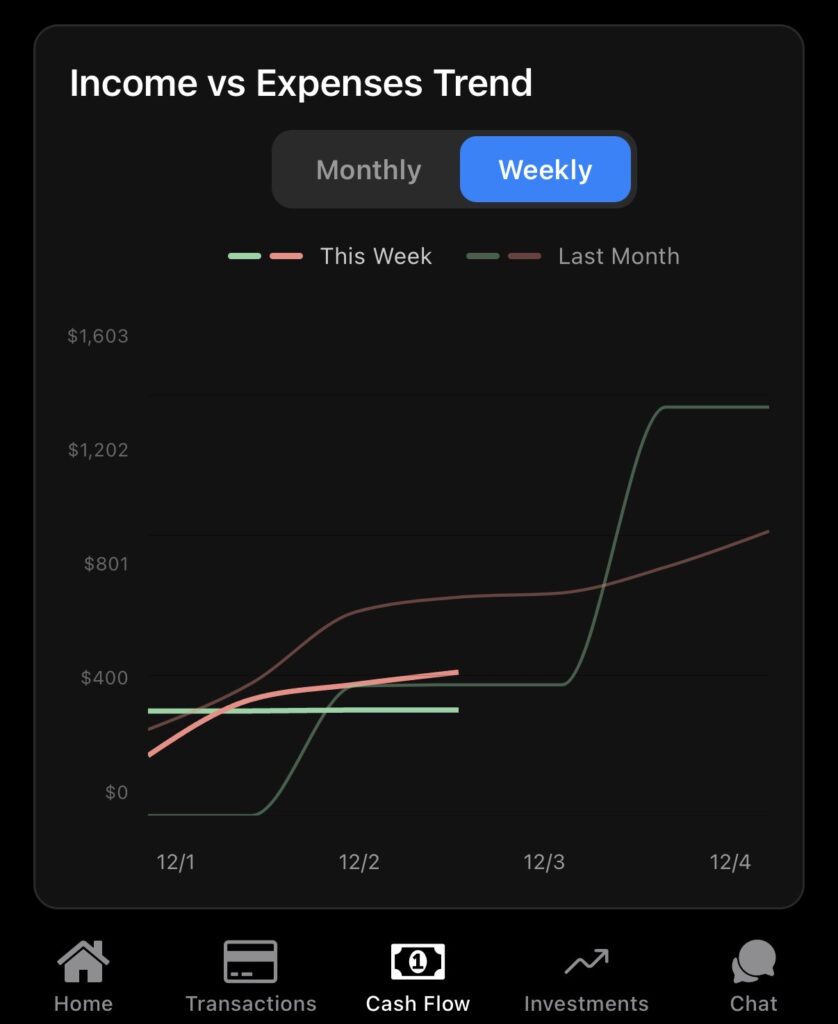
    From the Home Dashboard to Cash Flow and Savings Rate, every financial insight is now rendered in your chosen currency.

    🧠 Why This Matters

    Whether you’re:

    • Managing global investments
    • Getting paid in multiple currencies
    • Traveling abroad or planning to

    …this update ensures your net worth story is always consistent, comparable, and crystal clear.


    More enhancements are coming soon. Give it a try, and as always, we’d love your feedback.

    ➡️ Open NetTrack → Settings → Currency to get started.


    🧹 Clean Up Recurring Transactions

    You can now remove incorrectly flagged recurring transactions directly from the Recurring tab — helping you keep your data clean and your predictions accurate.

    Just swipe to delete any transaction that doesn’t belong in your recurring list.

    This is especially useful if one-off purchases (like that random gym visit or one-time Uber ride) get auto-classified as recurring.


    Be sure to reply and let us know what features or improvements you’d like to see next!